
Help
and How-to
Help
and How-to
The Service Calls Dashboard, near the top left of the main page, is one of the most used features of the SERVICEPower site.
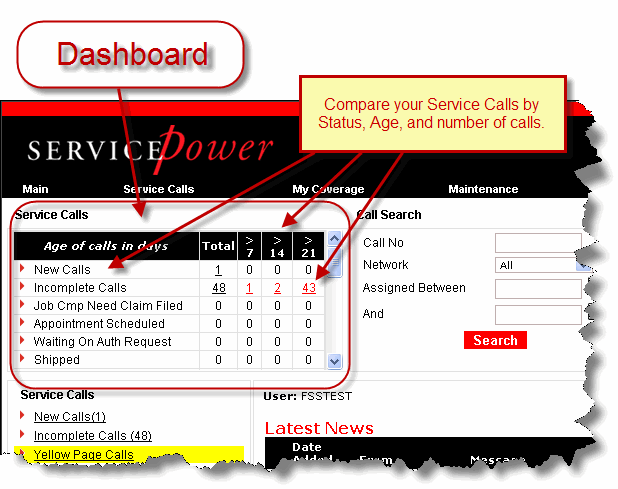
It allows you to see how your calls are aging and helps you determine which calls need immediate attention.
This section details the status and age of your calls in 7-day increments.
Click a number in the Total column to see all calls in that status (New, Incomplete, etc.) and to be able to act on those calls.
Click a number in a day increment column (>7, >14, or >21) to see a list of calls in that aging group, and to be able to act on those calls.
|
Meaning and use | |
|
New Calls |
Service call assignments which you have not yet accepted. (Same as Open Calls.) |
|
Incomplete Calls |
Service assignment calls which you have accepted but not completed. |
|
Job Cmp Need Claim Filed |
Job has been completed, but no claim has been filed. |
|
Appointment Scheduled |
Appointment has been scheduled. |
|
Waiting On Auth Request |
Call is waiting on authorization from manufacturer. |
|
Shipped |
Ordered parts have been shipped. |
|
Onsite |
Service Technician is onsite. |
|
Ready To Be Shipped - Create BOL |
Parts are ready to be shipped, waiting on bill of lading. |
|
Uneconomical To Repair |
Repair is uneconomical. |
|
Diagnosed |
Problem has been diagnosed. |
|
Accepted |
Call has been accepted by servicing organization. |
|
Rescheduled |
Service call has been rescheduled. |
|
Shipped To Store |
Parts have been shipped to store. |
|
Received At Store |
Parts have been received at store. |
|
Waiting On Cust Not Sched |
Service call has not been scheduled--waiting on customer. |
|
Parts On Order |
Parts have been ordered. |
|
Parts Ordered |
Parts have been ordered |
|
Enroute |
Service Technician is enroute to customer site. |
|
Waiting On Auth Request R |
Service call is waiting for authorization. |
|
Received |
Parts have been received by servicing organization. |
|
Waiting On Tech Assist |
Waiting for technical assistance. |
|
Waiting On Parts |
Waiting for parts. |